Archive
Real-Time Framework [ Single- to Multi-Server Online Game ]
ได้มีโอกาสร่วมอยู่ในงานวิจัย และพัฒนาเกมที่เป็นกึ่ง ๆ online game แบบ single-server ซึ่ง เดินมาถึงจุดที่ single – server ไม่สามารถให้บริการได้เนื่องจาก มี ผู้ใช้มากขึ้น และจำนวน object หรือ entity ก็มากขึ้นเป็นเงาตามตัวเช่นเดียวกัน การพัฒนาก็เริ่มมอง หา solution ทำจะช่วยแก้ปัญหาโดยต้องใช้ เวลา และ แรงงาน ไม่มากนัก และ RTF ก็เป็น solution หนึ่งที่ น่าสนใจเป็นอย่างยิ่ง ครับ
Real-Time Framework หรือ RTF คือ middleware ที่จะช่วยให้เราสามารถเปลี่ยน Single-Server ให้เป็น Multi-Server online game ครับ อ้างจาก cast study ที่อ้างอิงในบทความนี้ นะครับว่า game ประเภท Fast-paced action เช่น First Persons Shooters หรือ FPS นั้น หากต้องการความสามารถ ในการ ขยายระบบรองรับผู้เล่นจำนวนมาก แล้วละก็ ต้องมี สถาปัตยกรรม แบบ multi-server ถึง จะทำได้ แต่การทำ mult-server นั้นเป็นงานที่ท้าทายต่อผู้พัฒนา เนื่องจาก การประมวลผลจะต้องเป็นการประมวลผลแบบ ขนาน และการ distribute game state ก็ต้องทำอย่าง มีประสิทธิภาพ ครับ สองงานหลัก ๆ ที่ game แบบ multi-server นั้นต้อง จัดการให้ได้ ก็คือ เรื่องของการ ทำให้เป็นการประมวลผลแบบขนาน และ การประสานงาน การแจกจ่ายสถานะของ game ให้ได้ประสิทธิภาพ
เนื่องจากว่า มุมมองที่เราจะนำ RTF มาใช้งานก็คือผู้พัฒนา ที่มี game ที่เป็น single-server เป็นของตัวเองอยู่แล้ว และต้องการ ปรับปรุง ให้เป็น multi-server โดยที่ไม่ต้องไปลือระบบของตัวเอง จนแทบจะเรียกได้ว่า ต้องทำกันไหม อะไร แบบนั้นอะครับ เนื่องจากว่า RTF นั้น จะช่วย ในเรื่องของ การทำ parallelization และ การจัดการกับ game state โดยเฉพาะในเรื่องของการแจกจ่าย game state ให้อัตโนมัติ ผุ้พัฒนาที่ใช้ RTF ไม่ต้องเข้าไปดำเนินการเรื่องนี้ เพียงแค่เรียกใช้ผ่าน hight level support ของ RTF เท่านั้นเอง
เพื่อให้ภาพนะครับ ดูจากภาพ แรก
 จากภาพเป็นโครงสร้างและการทำงานของ game แบบ single-server นะครับ จะเห็นว่า server เพียงตัวเดียวควบคุมการทำงานทั้งหมด การคำนวน game states การโต้ตอบกับ ผู้ใช้ และการกระจาย game states กลับไปให้ client ทั้งหมด ครับ รูปต่อไป
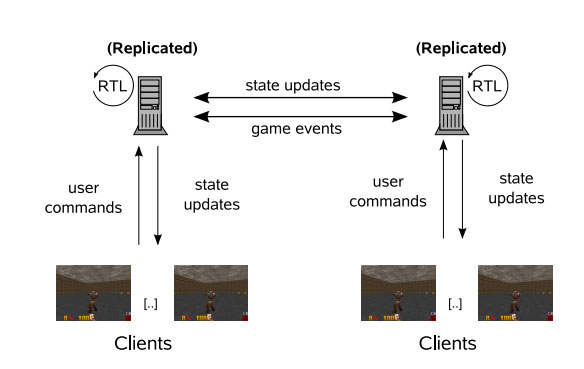
จากภาพแสดงให้เป็น สถาปัตยกรรมแบบ Multi-server game จะเห็นว่า งานการประมวลผล game state การโต้ตอบกับผู้ใช้และการ กระจาย game state นั้นถูกแบ่งออกไป ให้ server อื่น ๆ ช่วยทำงาน ซึ่งจะเห็นได้ว่า แน่นอนครับการขยายระบบ การเพิ่มจำนวนผู้เล่น ย่อมเกิดขึ้นได้ โดยสถาปัตยกรรมแบบ mult-server
ปัญหาคือว่า ผู้พัฒนาที่มี game ที่เป็น single-server อยู่ในมือจะทำให้เป็น mult-server ได้ด้วย RTF อย่างไร (ตามที่ได้กล่าวไปแล้วว่า RTF จะช่วยให้ เราเปลี่ยจาก single-server เป็นเป็น Multi-server ได้) จะขอไว้ต่อใน คราวหน้านะครับ
s_teerapong2000@yahoo.com – Soft Speed Solution
Reference
[From a Single- to Multi-Server Online Game: A Quake 3 Case Study Using RTF , Alexander Ploss, Stefan Wichmann, Frank Glinka , and Sergei Gorlatch University of Munster, Germany]
แนะนำ การใช้งาน String ใน C++ Win32 – Charater Encodings
ท่านครับ เป็นเรื่องปวดหัวเป็นอย่างยิ่งที่เรา จะต้องแก้ปัญหา เรื่อง ความหลากหลายทางพันธุกรรมของ ข้อมูล string ที่ใช้งานอยู่ใน c++ ไอ้กระผม ก็รู้จักเพียงอย่างเดียวว่า ข้อมูลแบบ string ก็คือ char * ( array ของ character นั่นเอง ตบท้ายด้วย ‘\O’ ) เท่านั้น ต่อมามันรู้สึกว่า ไม่พอเสียแล้ว เวลาไปแก้ปัญหา โปรแกรม ที่มี แบบข้อมูล string ชนิดอื่น ก็ เลยไม่เข้าใจ มึนงง และ หาทางออกไม่ได้ ก็เลยต้อง มานั่ง ศึกษาสักนิดให้เข้าออกเข้าใจ แล้วก็เอามาแบ่งปัน ให้กัน ท่านทั้งหลาย “
มาปูพื้นกันก่อน นะครับ มาทำความรู้จักกับ ASCII DBCS Unicode
เนื่องจากว่า string ในแบบของ C-style นั้น มันก็คือ arrays ของ characters ก็หมายความว่าเราก็ควรที่จะรู้จัก characters กันให้ถ่องแท้ซะก่อน เขาบอกว่า characters นั้นมีการแบบเข้ารหัส (characters encoding schemes ) 3 แบบ และ ก็แบบของข้อมูลอยู่ 3 ชนิดเช่นเดียวกัน ครับ
character encoding scheme อันแรกก็คือ single-byte character set หรือ SBCS ในการเข้ารหัสแบบนี้ หนึ่ง character ต่อหนึ่ง byte พอดิบพอดีไม่เกินนั้น ตัวอย่างเช่น การเข้ารหัสแบบ ASCII ไงครับ และการปิดท้าย string ของ SBCS ก็ใช้ single zero byte.
character encoding scheme ถัดไปก็คือ multi-byte character set หรือ MBCS ครับ การเข้ารหัสแบบนี้ บาง character ก็มีความยาว 1 byte บาง character ก็มีความยาวมากกว่า 1 bytes MBCS ที่ใช้ใน Windows มี อยู่ 2 ชนิดคือ
single-byte characters และ double-byte characters และเรามักจะ double-byte characters set หรือ DBCS แทน MBCS เนื่องจากว่า multi-byte character ที่ยาวที่สุดที่ใช้ใน windows นั้น ยาวเท่ากับ 2 byte นั่นเอง
ข้อมูลเพิ่มเติมของ DBCS encoding ข้อมูลบ้างส่วนจะถูก reserved ไว้สำหรับการกำหนดว่า มันคือ double-byte character เช่น การ encoding แบบ Shift-JIT ( ใช้กับภาษา ญี่ปุ่น ) จะมีค่า 0x81-0x9F และ 0xE0-0xFC หมายถึง นี่คือ double-byte character และข้อมูลถัดจากนี้ไป เป็นข้อมูลของ character นี้ ครับ ค่าดังกล่าวเราเรียกว่า lead bytes และ จะมากกว่า 0x7F เสมอ ข้อมูลที่ถัดจาก lead byte เรียกว่า trail byte และ ข้อมูลในส่วนนี้เป็นค่าอะไรก็ได้ที่ไม่ใช่ 0 หรือ none-zero value และก็เช่นเดียวกันกับ SBCS string ของ DBCS นั้น จบด้วย single zero byte
character encoding แบบสุดท้าย ก็คือ Unicode -unicode เป็นมาตรฐานการ เข้ารหัสที่ ทุก characater แทนด้วยข้อมูล ขนาด 2 byte ครับ บางที่เราก็เรียก Unicode ว่า Wide characters เพราะมันกว้างกว่า single-byte characters ครับ ก็มันกว้างกว่า ก็เท่านั้น เอง และมันก็ไม่เหมือน กัย MBCS เนื่องจากว่า ใน การแทนข้อมูลของ MBCS นั้นสามารถแทนได้ด้วย 1 byte ก็ได้ 2 byte ก็ได้ นั่นเอง ส่วนการจบท้ายอขง Unicode string ใช้ two zero bytes
ตัวอย่างของการใช้งานของแต่ละชนิดก็อย่างเช่น Single-byte characters ใช้แทนข้อมูล ตัวอักษร Latin ตัวอักษรที่ใช้กำหนด accented และ ตัวอ้กษร graphics แบบ encoding ที่เรารู้จัก ก็อย่างเช่น ASCII และ DOS Operating system. ส่วน Double-byte characters นั้นใช้กับภาษา ของประเทศในแถบ เอเชียตะวันออก และ ตะวันออกกลาง และสุดท้าย Unicode ใช้ใน COM และใช้ใน Windows NT.
ที่แน่ ๆ นะครับเรารู้จักคุ้นเคยกับ single-byte characters อยู่แล้ว เวลาเราเขียนโปรแกรม เรียกใช้ char หมายถึงคุณกำลังดำเนินการับ single-byte character ครับ ส่วน double-byte เราก็ประกาศด้วย char เช่นเดียวกัน ส่วน Unicode นั้น เราแทนเด้วย wchar_t และ ตัวอักษร และ string literals แบบ Unicode ให้นำหน้าด้วย L เช่น ตัวอย่าง
wchar_t wch = L’1′; // ใช้ 2 bytes
wchar_t wsz = L”Hello”; // 10 bytes + 2 bytes ( two zero bytes – to terminate the string )
การใช้งาน functions ที่กัดการเกี่ยวกับ String – ( string handling function )
อย่างที่ได้เคยรู้จัก C string functions เช่น strycpy() sprintf() atol() ฟังก์ชันเหล่านี้ เราใช้กับ single-byte string เท่านั้นนะครับ อย่างไรก็ตาม ใน standard library ก็ยั้งได้จัด function ในการทำงานลักษณะเดียวกัน ให้กับ Unicode string เช่น wcscpy() swprintf() _wtol()
เอาไว้เท่านี้ก่อนดีมั่ยครับ เอาเป็นไปต่อกันในตอนนที่ 2 นะครับ
ประยุกค์ใช้ Template patterns และ Generics เพื่อสร้าง Data Access Layer
ในบทความนี้แสดง การทำงานร่วมกัน ของ template pattern และ Generics ของ .Net framework เพื่อสร้าง Data Access Layer …..
เพื่อความเข้าใจ ขออธิบาย template pattern ก่อนนะครับ สำหรับ template pattern นั้น จุดประสงค์ของการใช้งานนั้นคือ เพื่อที่จะแบ่ง code ที่ต้องการให้ เปลี่ยน กับ code ที่ไม่ต้องการให้เปลี่ยน ตัว template pattern นั้นใช้สำหรับ code ที่คงที่ และถูกเรียกใช้งานบ่อยใน class ดังนั้นหลากเราพบว่าต้องเขียน code เดิม ๆ บ่อยครั้ง เราสามารถลดงานตรงนั้นได้ด้วย template pattern.
เพื่อให้เห็นภาพ เราลองมาดูตัวอย่างกันนะครับ ลักษณะของงานที่จะต้องใช้ template pattern ดังที่พูดไปก็คือ มี class หลาย class ที่มี การทำงาน คล้ายกัน หรือ มีลักษณะของ พฤติกรรมคล้าย ๆ กัน ครับตัวอย่างของเราก็คือ GetTheFancyNumber()
// DoSometing class
Public class DoSomething
{
   private int m_number;
   public int GetTheFancyNumber()
   {
     int  theNumber = m_number;
     // Do lats of crazy staff to theNumber here.
     Return theNumber;
   }

}

// DoSomethingElse class
Public class DoSomethingElse
 {
    private int m_number;
    public int GetTheFancyNumber()
    {
      int theNumber = m_number;
       // Do lots of crazy staff to theNumber Here.
       return theNumber;
    }
 }
ตัวอย่างพยายามแสดงให้เห็นว่า ทั้งสอง class นั้น มี การทำงาน เหมือนกัน เราสามารถที่นำ code นั้นมาใส่ไว้ใน base class และ ส่วนที่ต่างกันยกให้เป็นหน้าที่ของ class ลูก หรือ class ที่สืบทอดไปจัดการต่อ จากในตัวอย่างของเรานั้น เราจะนำ “GetTheFancyNumber()” method ใส่ไว้ใน base class และทำการ encapsulate สำหรับการกำหนดค่าให้กับ ตัวแปร theNumber ให้ class ที่สืบทอดไป ดำเนินการเอง ครับ ดังนั้น code ที่เราจะได้สำหรับการสร้าง base class จะได้ดังนี้
Public abstract class DoSomethingBase
{
   protected abstract int GetTheNumber();
   public int GetTheFancyNumber()
   {
       int theNumber = GetTheNumber();
       // do something to theNumber here.
       return theNumber;
    }
}
เราสร้าง child class เราใช้ logic ที่ encapsulated ด้วย template ( GetFancyNumber()) และทำการ implement ในส่วนที่ class ลูก อาจจะใช้วิธีการหาตัวเลขแตกต่างกัน ก็คือ GetTheNumber() ครับ ดังตัวอย่าง
Public class DoSomethingElse : DoSomethingBase
{
    private int m_number;
    protected override int GetTheNumber()
    {
        return m_number;
    }
}
Public class DoSomething : DoSomethingBas
{
    private int m_number;
    protected override int GetTheNumber()
    {
         return m_number;
    }
}
ครับ ในส่วนของ template pattern นี้เราคงพอได้ concept แล้วนะครับ สำหรับ template pattern นี้หากเรานำมาใช้งานร่วมกับ generics แล้วจะได้ประสิทธิภาพมาก ซึ่งจะได้ดูในตัวอย่างต่อไป ครับ
ในส่วนต่อไปเมื่อเข้าใจ การประยุกค์ใช้ template design pattern แล้ว เราจะนำ template นี้มาทำงานร่วมกับ generics ครับ
ในเรื่องของ การทำงานกับ database นั้น มีอยู่งานหนึ่งที่เราต้องทำ ทุกครั้งคือ การเข้าถึง database แล้วดึงข้อมูลออกจาก database และ สร้าง object ของข้อมูลนั้นเพื่อนำมาใช้งานต่อไป ส่วนของงานดังกล่าวนี้ ก็คือ DAL (Data access layer ) ครับ ซึ่งเราจะลองมา implement ด้วย template pattern. กันครับ
สมมุติว่าเรามี table ที่ชื่อว่า Person ดังนี้ครับ
Create table [tblPerson](
[PersonId] [int] IDENTITY (1,1) NOT NULL,
[FirstName] [Nvarchar] (50),
[LastName] [Nvarchar] (50),
[Email] [Nvarchar] (50),
CONSTRAINT [PK_tblPerson] PRIMARY KEY CLUSTERED
([PersonId]) ON [PRIMARY]
) ON [PRIMARY]
และเราสร้าง class สำหรับการเก็บข้อมูล Person ในแต่ละ record ดังนี้ครับ
 public class Person
{
     string m_email;
     string m_firstname;
     string m_lastname;
     int m_id;

     Persion()
     {
     }
     public string Email
      {
           get{ return m_email;}
           set{ m_email = value;}
      }
     public string FirstName
     {
           get{ return m_firstname; }
           set{ m_firstname = value; }
     }
    public string LastName
    {
          get{return m_lastname;}
          set{m_lastname = value;}
    }
    public int Id
    {
         get{return m_id;}
         set{m_id = value; }
    }
}
ครับ ในการ access database มีอยู่ 2 สิ่งที่เราต้องทำ เสมอคือ
1 access database – run คำสั่ง (command) – get result
2 เรา นำข้อมูลที่ได้ (result) มาสร้างเป็น object
ทั้งสอง ขั้นตอนนี้ เหมาะสำหรับการ implement ด้วย template pattern นะครับ เราลองมาดูที่ ข้อ 2 ก่อนนะครับ เราเรียกมันว่า mapping
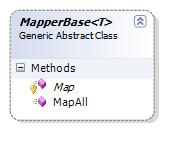
เราจะทำการสร้าง Base class ที่มีหน้าที่ในการ map ข้อมูลที่ได้จากการ ประมวลผล command มาสร้างเป็น object ของข้อมูลนั้น และนำมาใส่ไว้ใน collection นะครับ เราจะสร้าง base class ที่เป็น generic นะครับมีหน้าตอดังนี้
Abstract class MapperBase<T>
{
     protected abstract T Map(IDataRecord record);
     public Collection<T> MapAll(IDataReader reader)
     {
        Collection <T> collection = new Collection<T>();
        while(reader.Read())
        {
             try{
                collection.add(Map(reader));
             }catch{
                   throw;
             }
        }
        return collection;
     }
}
ต่อไปเราลองมาดูการ สืบทอด จาก MapperBase เพื่อสร้าง Person objects ดูนะครับ
    public class PersonMapper :MapperBase<Person>
    {
        protected override Person Map(IDataRecord record)
        {
            //throw new Exception("The method or operation is not implemented.");
            try
            {
                Person p = new Person();
                p.Id = (DBNull.Value == record["PersonId"]) ? 0 : (int)record["PersonId"];
                p.FirstName = (DBNull.Value == record["firstname"]) ? string.Empty : (string)record["firstname"];
                p.LastName = (DBNull.Value == record["lastname"]) ? string.Empty : (string)record["lastname"];
                p.Email = (DBNull.Value == record["email"]) ? string.Empty : (string)record["email"];

                return p;
            }
            catch (Exception)
            {

                throw;
            }
        }
    }
เป็นงัยครับ ง่ายไหม ครับการสร้าง mapper ให้กับ class ที่เราดึงข้อมูลมาจาก ตารางข้อมูล
ต่อไปเป็นการ ใช้ template pattern + generice เพื่อสร้าง data access
เรามาดูกันว่า งานอะไรบ้างที่ต้องมีการเปลี่ยนแปลงหรือ มีรายละเอียดของงานต่างกัน สำหรับการเข้าถึงแต่ละ table ครับ
1 การได้มาซึ่ง connection
2 การสร้าง sql command และ sql command type
3 และ การได้มาซึ่ง mapper (จากหัวข้อที่แล้ว)
ซึ่งเราจะกำหนด ให้เป็น abstract method ดังนี้
IDbConnection GetConnection();
string CommandText { get; }
CommandType CommandType { get; }
Collection GetParameters(IDbCommand command);
MapperBase GetMapper();
ตามที่ได้ทราบแล้วนะครับ methods ดังกล่าวนั้นจะต้องถูก overrided ด้วย class ใดก็ตามที่ สืบทอด base class ที่จะกล่าวต่อไป นี้
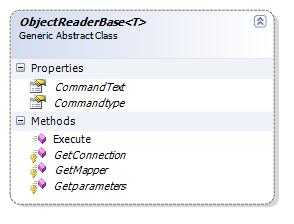
ส่วนงานที่เราสมมุติว่าต้องมีกระบวนการเหมือน เราก็ใส่ไว้ใน method ที่ชื่อว่า Execute() ซึ่งจะเป็นผู้สร้าง collection ของ object ที่เราต้องการ
    public abstract class ObjectReaderBase<T>
    {
        protected abstract IDbConnection GetConnection();
        public abstract string CommandText { get;}
        public abstract CommandType Commandtype { get;}
        protected abstract Collection<IDataParameter> Getparameters(IDbCommand command);
        protected abstract MapperBase<T> GetMapper();

        public Collection<T> Execute()
        {
            Collection<T> collection = new Collection<T>();
            using (IDbConnection connection = GetConnection())
            {
                IDbCommand command = connection.CreateCommand();
                command.CommandText = CommandText();
                command.CommandType = Commandtype();
                foreach (IDataParameter param in this.Getparameters(command))
                    command.Parameters.Add(param);

                try
                {
                    connection.Open();
                    using (IDataReader reader = command.ExecuteReader())
                    {
                        try
                        {
                            MapperBase<T> mapper = GetMapper();
                            collection = mapper.MapAll(reader);
                            return collection;
                        }
                        catch (Exception)
                        {

                            throw;
                        }
                        finally
                        {
                            reader.Close();
                        }
                    }
                }
                catch (Exception)
                {

                    throw;
                }
                finally {
                    connection.Close();
                }
            }
        }

    }
และต่อไปนี้เป็นตัวอย่างของ การใช้งาน ObjectReaderBase โดยเราจะทำการ สร้าง child class ชื่อ PersonReader ดังนี้
class PersonReader: ObjectReaderBase<Person>
{
    private static string m_connectionString =
         @"Data Source=DATA_SOURCE_NAME;Initial Catalog=Test;Integrated Security=True";

    protected override System.Data.IDbConnection GetConnection()
    {
        // update to get your connection here

        IDbConnection connection = new SqlConnection(m_connectionString);
        return connection;
    }
    protected override string CommandText
    {
        get { return "SELECT PersonID, FirstName, LastName, Email FROM tblPerson"; }
    }

    protected override CommandType CommandType
    {
        get { return System.Data.CommandType.Text; }
    }

    protected override Collection<IDataParameter> GetParameters(IDbCommand command)
    {
        Collection<IDataParameter> collection = new Collection<IDataParameter>();
        return collection;

        //// USE THIS IF YOU ACTUALLY HAVE PARAMETERS
        //IDataParameter param1 = command.CreateParameter();
        //param1.ParameterName = "paramName 1"; // put parameter name here
        //param1.Value = 5; // put value here;

        //collection.Add(param1);

        //return collection;
    }

    protected override MapperBase<Person> GetMapper()
    {
        MapperBase<Person> mapper = new PersonMapper();
        return mapper;
    }
}

ครับคงได้แนวความคิด สำหรับการใช้งาน template pattern บวกกับ generics นะครับ คงพอมี ideas สำหรับการนำไปปรับปรุงใช้งาน หรือนำไปเพิ่มเติมให้ได้ตามความต้องการใช้งาน นะครับ
ครับ เพื่อการนำไปใช้ ท่านก็คงต้องเพิ่มเติม วิธีการเข้าถึง database ในรูปแบบต่าง ๆ เช่น ExecuteNonquery() หรือ ExecuteScalar() ครับ สุดท้ายมาดูการ ใช้งานสักนิดนะครับ
static void Main(string[] args)
{
    PersonReader reader = new PersonReader();
    Collection<Person> people = reader.Execute();

    foreach (Person p in people)
        Console.WriteLine(string.Format("{0}, {1}: {2}",
            p.LastName, p.FirstName, p.Email));

    Console.ReadLine();

}
<pre>
ครับสิ่งหนึ่งที่เราได้ ประโยชน์จากการใช้งานรูปแบบนี้นั้น ก็คือเราสามารถลดงานที่ต้องเขียน code ลงไปมากเนื่องจาก เราได้ลดส่วนที่ต้องทำทุกครั้งเหมือน ๆ กัน แยกออกไป จากส่วนที่ ต้องทำงานแตกต่างกันในแต่ละครั้ง ทำให้การ บำรุงรักษา นั้นง่ายและสะดวก และลดจำนวน code ที่ต้องเขียนลงมากครับ
ธีระพงษ์ สนธยามาลย์ Soft Speed solution ‘s Senior Programmer , s_teerapong2000@yahoo.com
ที่มาของบท ความ An elegant C# Data Access Layer using the Template Pattern and Generics , By Matthew Cochran May 22, 2006
และบทความที่ ใกล้เคียงครับ http://www.codeproject.com/KB/database/BusinessObjectHelper.aspx
Design patterns คำตอบของการแก้ปัญหาเชิง software architectures…
ผมเคยเขียนเกี่ยว design pattern ไปบ้างแล้วโดย ยกเอาบาง design pattern มาอธิบาย และแสดงตัวอย่าง เขียนเสร็จแล้ว อ่านเองก็ยังไม่ค่อยเข้าใจครับ ผมก็เลยคิดว่าจะหาที่ reference ดี ๆ ที่เขามีวิธีการอธิบายดีให้เราได้เข้าใจกันง่าย ๆ และมีตัวอย่างที่เห็นภาพการใช้งาน และก็จะกล่าวถึงให้ครบถ้วนทุกตัวตราบเท่าที่ความขยันยังมีอยู่ ครับ
ท่านที่เป็น โปรแกรมเมอร์ทั้งหลายทราบดีอยู่แล้วว่า design pattern ก็คือ รูปแบบที่สามามารถนำมาใช้แก้ปัญหา ใน ปัญหา หลากหลายรูปแบบต่าง ๆ กัน ซึ่งรูปแบบดังกล่าวนี้ ได้ถูกปรับปรุงครั้งแล้วครั้งเล่าจน ได้ รูปแบบต่าง ๆ ออก มาเป็น design pattern ในแต่ละชนิด ใช้แก้ปัญหา ในแต่ละแบบต่าง กันไปตามความเหมาะสม (หรือ ความหมายตาม วิกิพีเดีย)
กล่าวกันว่าถ้าเราสามารถทำความเข้าใจ design pattern แต่ละตัวอย่างลึกซึ่งแล้ว ท่านจะสามารถนำไปใช้พัฒนา การออกแบบ สถาปัตยกรรม software ให้มีความ ทนทานและมีความยืดหยุ่น สูง ง่ายต่อการ บำรุงรักษา ง่ายต่อการปรับปรุง
Gang of Four (GOF) patterns นั้นถือว่าเป็นพื้นฐานของ design patterns อื่น ๆ ทั้งหมด ได้มีการแยกแยะออกเป็น กลุ่ม ได้ 3 กลุ่ม คือ Creational Structural และ Behavioral ซึ่งผมจะกล่าวถึง design pattern หมดในแต่ละกลุ่มโดยละเอียด – ดังนี้
| Creational Patterns | |
| – Abstract Factory | |
| – Builder | |
| – Factory Method | |
| – Prototype | |
| – Singleton | |
| Structural Patterns | |
| – Adapter | |
| – Bridge | |
| – Composite | |
| – Decorator | |
| – Facade | |
| – Flyweight | |
| – Proxy | |
| Behavioral Patterns | |
| – Chain of Resp. | |
| – Command | |
| – Interpreter | |
| – Iterator | |
| – Mediator | |
| – Memento | |
| – Observer | |
| – State | |
| – Strategy | |
| – Template Method | |
| – Visitor | |
Teerapong Sontayaman , Soft Speed solution – senior programmer s_teerapong2000@yahoo.com
Design Pattern: Singleton in C#
เรามรู้จัก design pattern กันดีกว่า เขาว่า ถ้าได้ทำความเข้าใจ ท่านจะเปลี่ยนวิถีการ ออกแบบ โปรแกรมของท่านตลอด ไป นอกจากนั้น ท่านผู้รู้ยังกล่าวว่า หากต้องการ ออกแบบโปรแกรมของท่านให้มี สถาปัตยกรรม ที่ ดีมีความยืดหยุ่นต่อการนำปใช้ และการบำรุงรักษาแล้วละก็ ต้องเรียนรู้เรื่อง Design pattern ซะ ….
นี่ก็เป็นสาเหตุหนึ่งให้ เราต้องหันมาพัฒนาตนเองต่อไป ผมก็เลยจะนำเอาเรื่องราวต่าง ๆ ที่นอกจากการ ที่เราจะเน้นหนักไปทางการเขียนแล้ว เราก็จะมองในเรื่อง ของ สถาปัตยกรรมของ ระบบด้วย ครับ นั่นเป็นสิ่งหนึ่งที่จทำให้เราส้รางโปรแกรมที่มี คุณภาพได้ สำหรับ บทความนี้ผมก็จะพูดเรื่อง design pattern ซึ่งก็คงจะพูดเป็น เรื่อง ๆ เนื่องจาก design patterns นั้นมีอยู่มากมาย และหลากหลายการใช้งาน ครับ สำหรับในบทนี้เราก็จะพูดถึง desgin pattern ที่ชื่อว่า “singleton”
สำหรับ คำจำกัดความของ Singleton pattern นั้น ท่านผู้รู้ก็กล่าวว่า ในบางครั้งเราต้องการให้ class มีเพียง หนึ่ง instance และให้มี มีช่องทางเข้าถึง เป็น global point access ครับ
sigleton pattern นี้เรามักจะใช้กับส่วนของระบบที่ต้องการให้ มี instance เดียวในระหว่างการทำงาน เช่น file system หรือ window manager ครับ … 🙂
รองมาดูส่วนที่เป็น code ของ class นี้ดูนะครับ
namespace DesignPatterns
{
    /// <summary>
    /// Singleton class implements that simplest version of the Singleton
    /// design pattern.
    /// </summary>
    public sealed class Singleton
    {
        private static readonly Singleton _instance = null;
        // make the default constructor private, so that no can directly create it.
        private Singleton()
        {
        }

        // public property that can only get the single instance of this class.
        public static Singleton Instance
        {
            get
            {
                if (_instance == null)
                    _instance = new Singleton();
                return _instance

            }
        }
    }
}
จาก code จะเห็นว่า constructor เราจะกำหนดให้เป็น private เพื่อให้ ไม่ให้ส่วนอื่นในโปรแกรมสามารถที่จะสร้าง instance ของ class นี้ได้ ซึ่งเป็นการ บังคับให้เป็นไปตามข้อกำหนด ของ pattern นี้
เราจะเห็นว่าเราได้ประกาศ ตัวแปร static ชื่อว่า _instance เป็น member variable ซึ่งมี datatype เป็นชนิดเดียวกับ class และ access ผ่านทาง property ชื่อ Instance (ตัวแปร static นั้นจะถูกสร้างไว้ครั้งเดียว ครั้งแรกที่ถูกเรียกใช้) และจะเห็นว่าตัวแปรนี้ไม่สามารถ แก้ไขได้เนื่องจากว่าถูกกำหนดให้เป็น readonly นะครับ
สุดท้ายดังที่กล่าวไป ครับ public Instance property นั้นถูก define ไว้เพื่อสำหรับส่งค่า ของตัวแปร _instance ให้กับผู้เรียกใช้ เท่านั้น ซึ่งถูกำหนดให้เป็น static property นี้มีไว้เพื่อให้เป็นที่ หลักในการ เข้าถึง instance ของ class ซึ่งเพื่อให้เป็นไปตามข้อกำหนด ของ pattern นี้
สุดท้ายจริง เรารองมาดูที่ code ของการเรียกใช้ class นี้กันนะครับ
static void Main(stirng [] args)
{
       Singleton obj1 = Singleton.Instance;
       Singleton obj2 = Singleton.Instance;
       obj1.ToString();
       obj2.ToString();
}
คงพอที่จะได้ idea บ้างนะครับ มีอะไรไม่เข้าใจ ก็ เมล์มาคุยได้นะครับ หรือ จะศึกษา singleton เพิ่มได้อีกตาม link เลยครับ
ธีระพงษ์ สนธยามาลย์ Senior Programmer Soft Speed Solution s_teerapong2000@yahoo.com

 Teerapong Sontayaman 's Kode Talker .NET