Archive
NHibernate Why ???
เป็นคำถามที่แรกที่หลายคนถามว่า ทำไมถึงต้อง NHibernate สำหรับผู้พัฒนาระบบ ที่ทำงานมายาวนานแล้ว พอที่จะรู้คำตอบในใจอยู่แล้วว่า การเขียน code เพื่อจัดการกับ object persistence นั้นเป็นเรื่องที่สร้างความ เหน็ดเหนื่อยให้ผู้พัฒนาเป็นอย่างมาก ผมก็เห็นด้วย เพราะงานในการอ่านข้อมูลจากฐานข้อมูล มาสร้างเป็น Object และบันทึกข้อมูลที่เป็น Object กลับลงฐานข้อมูลนั้น ใช้เวลา มากพอสมควร บางท่านบอกว่า อาจต้องใช้ถึง 1 ใน 4 ของ เวลาที่ต้อง coding ทั้งหมด [ผมหมายถึงเวลาที่เราเขียน n-tier aplication นะครับ] และงานพวกนี้ก็ ทำซ้ำซาก ใช้เวลา น่าเบื่อเป็นที่สุด
ครับได้มีการแก้ปัญหานี้กันอย่างกว้างขวาง อย่างเช่น การทำ code generator ให้กับ data acces layer สามารถสร้าง code ให้ได้ภายใน พริบตาเดียวแต่ปัญหาก็ยังคงอยู่เนื่องจาก หากมีการแก้ไขโครงสร้างฐานข้อมูลเมื่อใด ก็จำเป็นจะต้องมีการ re – create ใหม่อีก
สำหรับ Object-relational managers หรือ ORM อย่างเจ้า NHibernate นั้นแตกต่างครับ ท่าน มันสามารถจัดการกับ data acces ได้อย่างมีประสิทธิภาพ และสามารถเข้าถึงข้อมูลได้ง่าย เพียงไม่กี่บรรทัด
แนะนำ NHibernate
NHibernate เป็น เป็น persistence engine ในรูปของ Framworke เอาว่ามันทำหน้าที่ load และ สร้าง business object จากฐานข้อมูล และบันทึกการเปลี่ยนแปลงจาก object กลับลงฐานข้อมูล ครับ และสามารถทำง่ายดังพริกฝ่ามือ เติมให้อีกนิด
เจ้า NHibernate มันจะใช้ข้อมูลใน mapping files [ XML ] สำหรับการแปลงจาก ข้อมูลในฐานข้อมูล เป็น Objects [ ไอ้เจ้า Object ที่สัมพันธ์กับ table ในฐานข้อมูลนี่แหละที่เรียกว่า persistence object ]

ดังนั้นทำให้เราแค่ เพิ่ม code สองสามบรรทัด และสร้าง mapping file ให้กับ persistent class [ class ที่สัมพันธ์กับ table ในฐานข้อมูล ] ที่เหลือ เช่น การจัดการกับข้อมูลทั้งหมด NHibernate จะจัดการให้ สุดยอดไหมหล่ะครับ save เวลาไปเยอะนะครับ
ครับ NHibernate ไม่ใช่ ORM framework ที่มีอยู่เพียงอันเดียว ที่มีอยู่ ในโลกของ .NET นะครับ มีตัวอื่น ๆอีกมากมาย ไม่ว่าจะเป็น Open source หรือ commercial ที่ทำงานในลักษณะเดียวกันครับ แต่เจ้า NHibernate เป็นตัวหนึ่งที่ค่อนข้างเป็นที่นิยมกันครับ อาจจะเป็นเพราะว่ามันมี บรรพบุรูษเป็น Hibernate ซึ่งเป็น ORM Framework ยอดนิยมของ Java ก็เป็นได้ นอกจากนั้น Microsoft สัญญาว่าจะมี Entity Framework สำหรับ ADO.NET ที่มีความสามารถเป็น ORM แต่มันก็ยังไม่คลอดออกว่า คงต้องรอก็ต่อไปสักพักนะครับ
ครับ สำหรับเรื่องของ NHibernate นั้นคงต้องว่ากันต่อไป นะครับส่วนท่าที่ต้องการจะอ่านเพิ่มเติมก็สามารถไปตาม link นี้นะครับ อ่านเพิ่มเติมได้ที่
ของผมเองก็มีเหมือนกันะครับ สะพานเชื่อมระหว่าง Object และ Database
s_teerapong2000@yahoo.com
NHibernate สะพานเชื่อมระหว่าง Object world และ Database world
นักพัฒนาทั้งหลายครับ สวัสดีปีใหม่ครับหวังว่าปีนี้คงจะมีอะไรที่ ใหม่ ๆ กับชีวิตนะครับ เงินทองหลั่งไหล สุภาพแข็งแรงนะครับ นับว่าเป็นเวลานานมากแล้วที่ผมไม่ได้เข้ามาเขียนบทความเลย ปีใหม่นี้ก็หวังว่าจะเริ่มเขียนให้มากขึ้น อยากจะแบ่งปัน ความรู้ให้กับเพื่อน ๆ โปรแกรมเมอร์ทั้งหลาย นะครับ
เรื่องในวันนี้นับเป็นเรื่องแรกแห่งปีนี้ ครับ อย่างที่ได้ขึ้นหัวไว้นะครับ NHibernate ถือว่าเป็น นวัตกรรม ของการพัฒนาซอฟต์แวร์ แห่งปีก็ว่าได้นะครับ นักพัฒนาระบบอย่างเรา คงจะเข้าใจได้นะครับ ว่าระบบฐานข้อมูลส่วนใหญ่ที่เราใช้งานั้น จะเป็น relational database ซะส่วนใหญ่ และการพัฒนาระบบในภาษาใหม่นั้น เราก็จะเน้นการเขียน แบบ Object oriented เมื่อเราทำงานในลักษณะ Object เราก็น่าจะสามารถมองเห็น ข้อมูลเป็น Object ด้วย แต่การ ทำ Data access Layer นั้น เป็นงานหนักทีเดียว ถ้าต้องการทำให้ การเขียนเป็น เชิง Object ทั้งหมด ทั้งนี้ผมกล่าวไปตามความเข้าใจ นะครับ และก็เข้าใจว่า NHibernate เป็นหนทางที่จะนำเราไปสู่การส้รางงานที่ง่ายขึ้น แต่จะเป็นอย่างไรนั้นคงจะต้องหาคำตอบ ไปด้วยกันนะครับ
คงจะต้องกล่าวถึง NHibernate ก่อนที่จะลองสัมผัส กันสักนิด นะครับ สำหรับ NHibernate นี่นั้นเขาเรียกกันว่า Object Relational Mapper (ORM) ทำหน้าที่ Map จาก Relational database มาเป็น Object ให้เราครับ ทำให้เราทำงานได้ง่ายขึ้นครับเพราะเราไม่ต้องไปงุ่มง่ามอยู่กับการเขียน Data access layer ง่ายอย่างไรนั้นคงต้อง ค่อย ๆ ดูตามผมไปก็แล้วกันนะครับ เพราะผมเองก็อยากรู้มากเหมือนกัน
เอาเป็นว่าเราเรียนรู้ NHibernate ผ่านทางต้วอย่างที่ผมจะรวบรวมมา จากง่ายไปหาอยากและเอาไปใช้งานจริง ๆ นะครับ
เครื่องมือที่เราจะใช้ใน ตัวอย่างแรกนี้ก็คงจะเป็น
- NHibernate version 2.1.2 ครับ load ตาม link นี้เลยครับ NHibernate-2.1.2.GA-bin
- Visual studio 2008 Express, C#
- SQL Server 2005 Express
ขั้นตอนการติดตั้ง NHibernate ก็ไม่ยากนะครับ ผมแตกออกแล้วเอาไว้ที่ c:\NHibernate-2.1.2 GA\ แล้ว ทำตามขั้นตอนต่อไปนี้นะครับ
ขั้นตอนที่ 1 :
- สร้าง Project ชื่อ Lesson3 แล้วสร้าง form แล้ววาง datagrideview ไว้ บน form นั้น นะครับแล้วทิ้งไว้ก่อน
- Add Reference -> NHibernate
- Click ขวาที่ชื่อ Project เลือก Add Reference
- Brows ไปยัง folder ที่แตกไว้แล้วเลือก NHibernate.dll ใน \Required_Bins
- ทำอีกครั้ง เพื่อ Add NHibernate.ByteCode.Castle.dll ใน \Required_For_LazyLoading\Castle
ขั้นตอนที่ 2 :
- Add new class -> company.cs
using System;
using System.Collections.Generic;
using System.Linq;
using System.Text;

namespace Lesson3
{
 public class company
 {
 public company() { }

 public virtual string companyid { get; set; }
 public virtual string companyname { get; set; }
 public virtual string companyemail { get; set; }
 public virtual string companysize { get; set; }

 }
}
- Add new XML -> Set as Embedded Resource [company.hbm.xml]
- สำคัญมากสำหรับ ไฟล์นี้ ต้องกำหนด properties ให้เป็น embedded resource
<?xml version="1.0" encoding="utf-8" ?>
<hibernate-mapping xmlns="urn:nhibernate-mapping-2.2" assembly="Lesson3" auto-import="true">
 <class name="Lesson3.company, Lesson3" table="company" lazy="true">
 <id name="companyid" type="string">
 <generator/>
 </id>
 <property name="companyname" type="string"/>
 <property name="companyemail" type="string"/>
 <property name="companysize" type="string"/>

 </class>

</hibernate-mapping>
ขั้นตอนที่ 3 :
- config and Execute
- Add using statment , เปิด form1 ที่เราวาง datagridview ไว้แล้วเพิ่ม using statement ตามนี้ครับ
...
using NHibernate;
using NHibernate.Cfg;
using NHibernate.ByteCode.Castle;
using System.Collections;
- แล้ว เพิ่ม code ลงใน constructor ดังนี้
Configuration config = new Configuration();
ISessionFactory factory;

 config.SetProperty(NHibernate.Cfg.Environment.ConnectionProvider, "NHibernate.Connection.DriverConnectionProvider");
 config.SetProperty(NHibernate.Cfg.Environment.Dialect, "NHibernate.Dialect.MsSql2005Dialect");
 config.SetProperty(NHibernate.Cfg.Environment.ConnectionDriver, "NHibernate.Driver.SqlClientDriver");
 config.SetProperty(NHibernate.Cfg.Environment.ConnectionString, @"Data Source=.\SQLEXPRESS;Initial Catalog=enterprise4;User ID=sa;Password=xxxx;Pooling=False");
 config.SetProperty(NHibernate.Cfg.Environment.ProxyFactoryFactoryClass, "NHibernate.ByteCode.Castle.ProxyFactoryFactory,NHibernate.ByteCode.Castle");

 config.AddAssembly(typeof(Lesson3.company).Assembly);

 factory = config.BuildSessionFactory();
 ISession session = null;
 try
 {
 session = factory.OpenSession();
 dataGridView1.DataSource = session.CreateCriteria(typeof(Lesson3.company)).List();
 }
 catch (Exception ex)
 {
 session.Close();
 MessageBox.Show(ex.Message);
 //throw;
 }
ลืมไปว่าท่านต้องทำการ สร้าง database ชื่อ enterprise4 โดยที่มี โครงส้รางข้อมูลดังนี้
CREATE TABLE [dbo].[company](
[companyid] [nchar](10) NOT NULL,
[companyname] [nchar](150) NULL,
[companyemail] [nchar](150) NULL,
[companysize] [nchar](10) NULL,
CONSTRAINT [PK_company] PRIMARY KEY CLUSTERED
(
[companyid] ASC
)WITH (PAD_INDEX = OFF, STATISTICS_NORECOMPUTE = OFF, IGNORE_DUP_KEY = OFF, ALLOW_ROW_LOCKS = ON, ALLOW_PAGE_LOCKS = ON) ON [PRIMARY]
) ON [PRIMARY]
หลังจากนี้ก็ลอง compile แล้วrun ดูนะครับ จะได้ข้อมูลขึ้นมาแสดง ให้ท่านเห็น อ้อ แต่อย่าลืม ใส่ข้อมูลลงตารางซะก่อนนะครับ
จาก เห็นมั้ยครับ ว่ามันจัดการอะไรให้เราบ้างเราแค่เขียน แค่นี้เราก็สามารถที่จะแสดงข้อมูลจาก table ได้แล้ว ดังนั้น ต้องติดตามกันต่อไปนะครับว่า การทำ operation ต่าง ๆ กับข้อมูลทำได้อย่างไรบ้าง
เช่นการ insert update และการ delete ซึ่งจะเก็บไว้เป็นตอนต่อไป ครับ ถ้ามีอะไรที่ต้องการ ถามก่อนก็ ว่ากันไปตามนี้นะครับ s_teerapong2000@yahoo.com ครับ Bye…
How to embed a form in a control – จับ from มาใส่ form
it’s another time there is some asking about how to show form into another form. i have been trying to find around the web to get the example . but i found the answer myself as following example. . . [try to understand my bad English] . ha ha
in this posting i will show how to put existing two form into one main form , by the way i’m doing this in main form i put the tab with two tab pages , first tabpage for first form and anther tab put second form. as following picture.
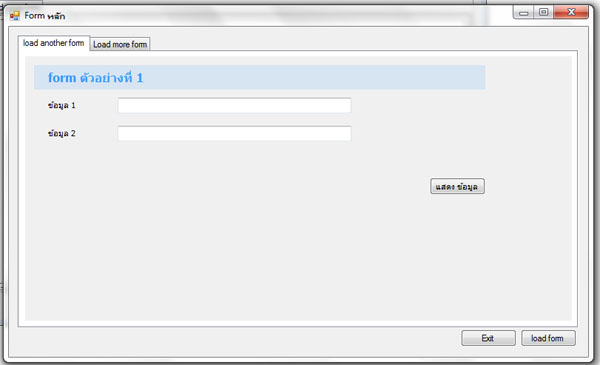 figure 1. show two tab in main form
By doing this i create the project with main form name form1.cs and another two is anotherform.cs and moreform.cs
First – put two tab into mainform (form1.cs) and place panel1 into tabpage1 and groupbox1 into tabpage2 [please note this the control must be a container control]
then – Create another two form , anotherform.cs and moreform.cs
anotherform.cs
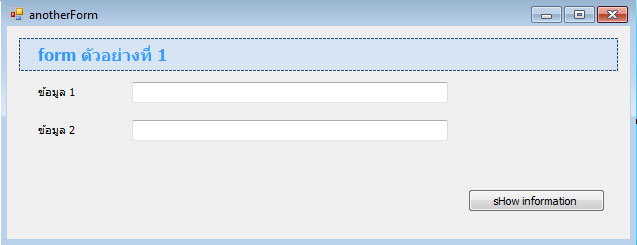 figure 2. show anotherform.cs
in this form show information of two textbox when you click ‘show information’ button
moreform.cs
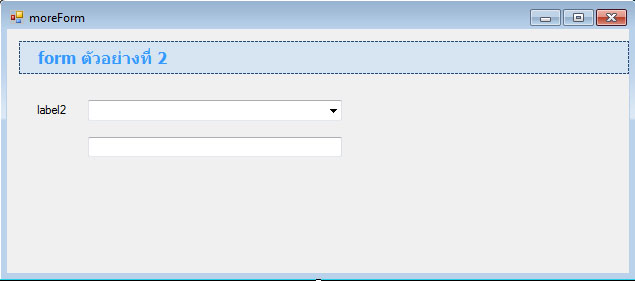 figure 3. show moreform.cs
in this form the textbox will show the selected text of above combobox…
I will not go in detail of how these two form work i will explain how it work in the main form.
in main form (form1.cs) , see the following code, better then explain…
public void ShowFormInControl(Control myctl, Form myfrm)
{

myfrm.TopLevel = false;
myfrm.FormBorderStyle = FormBorderStyle.None;
myfrm.Dock = DockStyle.Fill;
myfrm.Visible = true;
myctl.Controls.Add(myfrm);

 }

 private void button1_Click(object sender, EventArgs e)
 {
anotherForm myform = new anotherForm();
ShowFormInControl(panel1, myform);

moreForm myform2 = new moreForm();
ShowFormInControl(groupBox1, myform2);

 }
in the source code you can see the technique of how to put the form into control in the “ShowformInControl(Control myctl, Form myfrm) ” the function perform putting the form ( myfrm ) into Control( myctl ) as i mention earlier – the control must be container control. without any explanation it’s obviously show in the code…
then the forms are load by the click event of button1. – create form and put into control by calling ShowformInControl where ever you want to put , panel or groupbox or any contrainer control.
hope this will help … s_teerapong2000@yahoo.com
you can download code example here frmAdvance.zip
ประยุกค์ใช้ Template patterns และ Generics เพื่อสร้าง Data Access Layer
ในบทความนี้แสดง การทำงานร่วมกัน ของ template pattern และ Generics ของ .Net framework เพื่อสร้าง Data Access Layer …..
เพื่อความเข้าใจ ขออธิบาย template pattern ก่อนนะครับ สำหรับ template pattern นั้น จุดประสงค์ของการใช้งานนั้นคือ เพื่อที่จะแบ่ง code ที่ต้องการให้ เปลี่ยน กับ code ที่ไม่ต้องการให้เปลี่ยน ตัว template pattern นั้นใช้สำหรับ code ที่คงที่ และถูกเรียกใช้งานบ่อยใน class ดังนั้นหลากเราพบว่าต้องเขียน code เดิม ๆ บ่อยครั้ง เราสามารถลดงานตรงนั้นได้ด้วย template pattern.
เพื่อให้เห็นภาพ เราลองมาดูตัวอย่างกันนะครับ ลักษณะของงานที่จะต้องใช้ template pattern ดังที่พูดไปก็คือ มี class หลาย class ที่มี การทำงาน คล้ายกัน หรือ มีลักษณะของ พฤติกรรมคล้าย ๆ กัน ครับตัวอย่างของเราก็คือ GetTheFancyNumber()
// DoSometing class
Public class DoSomething
{
   private int m_number;
   public int GetTheFancyNumber()
   {
     int  theNumber = m_number;
     // Do lats of crazy staff to theNumber here.
     Return theNumber;
   }

}

// DoSomethingElse class
Public class DoSomethingElse
 {
    private int m_number;
    public int GetTheFancyNumber()
    {
      int theNumber = m_number;
       // Do lots of crazy staff to theNumber Here.
       return theNumber;
    }
 }
ตัวอย่างพยายามแสดงให้เห็นว่า ทั้งสอง class นั้น มี การทำงาน เหมือนกัน เราสามารถที่นำ code นั้นมาใส่ไว้ใน base class และ ส่วนที่ต่างกันยกให้เป็นหน้าที่ของ class ลูก หรือ class ที่สืบทอดไปจัดการต่อ จากในตัวอย่างของเรานั้น เราจะนำ “GetTheFancyNumber()” method ใส่ไว้ใน base class และทำการ encapsulate สำหรับการกำหนดค่าให้กับ ตัวแปร theNumber ให้ class ที่สืบทอดไป ดำเนินการเอง ครับ ดังนั้น code ที่เราจะได้สำหรับการสร้าง base class จะได้ดังนี้
Public abstract class DoSomethingBase
{
   protected abstract int GetTheNumber();
   public int GetTheFancyNumber()
   {
       int theNumber = GetTheNumber();
       // do something to theNumber here.
       return theNumber;
    }
}
เราสร้าง child class เราใช้ logic ที่ encapsulated ด้วย template ( GetFancyNumber()) และทำการ implement ในส่วนที่ class ลูก อาจจะใช้วิธีการหาตัวเลขแตกต่างกัน ก็คือ GetTheNumber() ครับ ดังตัวอย่าง
Public class DoSomethingElse : DoSomethingBase
{
    private int m_number;
    protected override int GetTheNumber()
    {
        return m_number;
    }
}
Public class DoSomething : DoSomethingBas
{
    private int m_number;
    protected override int GetTheNumber()
    {
         return m_number;
    }
}
ครับ ในส่วนของ template pattern นี้เราคงพอได้ concept แล้วนะครับ สำหรับ template pattern นี้หากเรานำมาใช้งานร่วมกับ generics แล้วจะได้ประสิทธิภาพมาก ซึ่งจะได้ดูในตัวอย่างต่อไป ครับ
ในส่วนต่อไปเมื่อเข้าใจ การประยุกค์ใช้ template design pattern แล้ว เราจะนำ template นี้มาทำงานร่วมกับ generics ครับ
ในเรื่องของ การทำงานกับ database นั้น มีอยู่งานหนึ่งที่เราต้องทำ ทุกครั้งคือ การเข้าถึง database แล้วดึงข้อมูลออกจาก database และ สร้าง object ของข้อมูลนั้นเพื่อนำมาใช้งานต่อไป ส่วนของงานดังกล่าวนี้ ก็คือ DAL (Data access layer ) ครับ ซึ่งเราจะลองมา implement ด้วย template pattern. กันครับ
สมมุติว่าเรามี table ที่ชื่อว่า Person ดังนี้ครับ
Create table [tblPerson](
[PersonId] [int] IDENTITY (1,1) NOT NULL,
[FirstName] [Nvarchar] (50),
[LastName] [Nvarchar] (50),
[Email] [Nvarchar] (50),
CONSTRAINT [PK_tblPerson] PRIMARY KEY CLUSTERED
([PersonId]) ON [PRIMARY]
) ON [PRIMARY]
และเราสร้าง class สำหรับการเก็บข้อมูล Person ในแต่ละ record ดังนี้ครับ
 public class Person
{
     string m_email;
     string m_firstname;
     string m_lastname;
     int m_id;

     Persion()
     {
     }
     public string Email
      {
           get{ return m_email;}
           set{ m_email = value;}
      }
     public string FirstName
     {
           get{ return m_firstname; }
           set{ m_firstname = value; }
     }
    public string LastName
    {
          get{return m_lastname;}
          set{m_lastname = value;}
    }
    public int Id
    {
         get{return m_id;}
         set{m_id = value; }
    }
}
ครับ ในการ access database มีอยู่ 2 สิ่งที่เราต้องทำ เสมอคือ
1 access database – run คำสั่ง (command) – get result
2 เรา นำข้อมูลที่ได้ (result) มาสร้างเป็น object
ทั้งสอง ขั้นตอนนี้ เหมาะสำหรับการ implement ด้วย template pattern นะครับ เราลองมาดูที่ ข้อ 2 ก่อนนะครับ เราเรียกมันว่า mapping
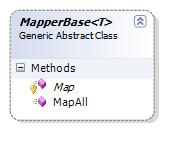
เราจะทำการสร้าง Base class ที่มีหน้าที่ในการ map ข้อมูลที่ได้จากการ ประมวลผล command มาสร้างเป็น object ของข้อมูลนั้น และนำมาใส่ไว้ใน collection นะครับ เราจะสร้าง base class ที่เป็น generic นะครับมีหน้าตอดังนี้
Abstract class MapperBase<T>
{
     protected abstract T Map(IDataRecord record);
     public Collection<T> MapAll(IDataReader reader)
     {
        Collection <T> collection = new Collection<T>();
        while(reader.Read())
        {
             try{
                collection.add(Map(reader));
             }catch{
                   throw;
             }
        }
        return collection;
     }
}
ต่อไปเราลองมาดูการ สืบทอด จาก MapperBase เพื่อสร้าง Person objects ดูนะครับ
    public class PersonMapper :MapperBase<Person>
    {
        protected override Person Map(IDataRecord record)
        {
            //throw new Exception("The method or operation is not implemented.");
            try
            {
                Person p = new Person();
                p.Id = (DBNull.Value == record["PersonId"]) ? 0 : (int)record["PersonId"];
                p.FirstName = (DBNull.Value == record["firstname"]) ? string.Empty : (string)record["firstname"];
                p.LastName = (DBNull.Value == record["lastname"]) ? string.Empty : (string)record["lastname"];
                p.Email = (DBNull.Value == record["email"]) ? string.Empty : (string)record["email"];

                return p;
            }
            catch (Exception)
            {

                throw;
            }
        }
    }
เป็นงัยครับ ง่ายไหม ครับการสร้าง mapper ให้กับ class ที่เราดึงข้อมูลมาจาก ตารางข้อมูล
ต่อไปเป็นการ ใช้ template pattern + generice เพื่อสร้าง data access
เรามาดูกันว่า งานอะไรบ้างที่ต้องมีการเปลี่ยนแปลงหรือ มีรายละเอียดของงานต่างกัน สำหรับการเข้าถึงแต่ละ table ครับ
1 การได้มาซึ่ง connection
2 การสร้าง sql command และ sql command type
3 และ การได้มาซึ่ง mapper (จากหัวข้อที่แล้ว)
ซึ่งเราจะกำหนด ให้เป็น abstract method ดังนี้
IDbConnection GetConnection();
string CommandText { get; }
CommandType CommandType { get; }
Collection GetParameters(IDbCommand command);
MapperBase GetMapper();
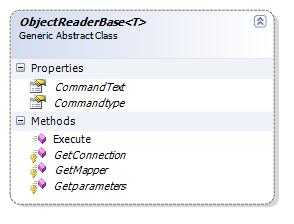
ตามที่ได้ทราบแล้วนะครับ methods ดังกล่าวนั้นจะต้องถูก overrided ด้วย class ใดก็ตามที่ สืบทอด base class ที่จะกล่าวต่อไป นี้
ส่วนงานที่เราสมมุติว่าต้องมีกระบวนการเหมือน เราก็ใส่ไว้ใน method ที่ชื่อว่า Execute() ซึ่งจะเป็นผู้สร้าง collection ของ object ที่เราต้องการ
    public abstract class ObjectReaderBase<T>
    {
        protected abstract IDbConnection GetConnection();
        public abstract string CommandText { get;}
        public abstract CommandType Commandtype { get;}
        protected abstract Collection<IDataParameter> Getparameters(IDbCommand command);
        protected abstract MapperBase<T> GetMapper();

        public Collection<T> Execute()
        {
            Collection<T> collection = new Collection<T>();
            using (IDbConnection connection = GetConnection())
            {
                IDbCommand command = connection.CreateCommand();
                command.CommandText = CommandText();
                command.CommandType = Commandtype();
                foreach (IDataParameter param in this.Getparameters(command))
                    command.Parameters.Add(param);

                try
                {
                    connection.Open();
                    using (IDataReader reader = command.ExecuteReader())
                    {
                        try
                        {
                            MapperBase<T> mapper = GetMapper();
                            collection = mapper.MapAll(reader);
                            return collection;
                        }
                        catch (Exception)
                        {

                            throw;
                        }
                        finally
                        {
                            reader.Close();
                        }
                    }
                }
                catch (Exception)
                {

                    throw;
                }
                finally {
                    connection.Close();
                }
            }
        }

    }
และต่อไปนี้เป็นตัวอย่างของ การใช้งาน ObjectReaderBase โดยเราจะทำการ สร้าง child class ชื่อ PersonReader ดังนี้
class PersonReader: ObjectReaderBase<Person>
{
    private static string m_connectionString =
         @"Data Source=DATA_SOURCE_NAME;Initial Catalog=Test;Integrated Security=True";

    protected override System.Data.IDbConnection GetConnection()
    {
        // update to get your connection here

        IDbConnection connection = new SqlConnection(m_connectionString);
        return connection;
    }
    protected override string CommandText
    {
        get { return "SELECT PersonID, FirstName, LastName, Email FROM tblPerson"; }
    }

    protected override CommandType CommandType
    {
        get { return System.Data.CommandType.Text; }
    }

    protected override Collection<IDataParameter> GetParameters(IDbCommand command)
    {
        Collection<IDataParameter> collection = new Collection<IDataParameter>();
        return collection;

        //// USE THIS IF YOU ACTUALLY HAVE PARAMETERS
        //IDataParameter param1 = command.CreateParameter();
        //param1.ParameterName = "paramName 1"; // put parameter name here
        //param1.Value = 5; // put value here;

        //collection.Add(param1);

        //return collection;
    }

    protected override MapperBase<Person> GetMapper()
    {
        MapperBase<Person> mapper = new PersonMapper();
        return mapper;
    }
}

ครับคงได้แนวความคิด สำหรับการใช้งาน template pattern บวกกับ generics นะครับ คงพอมี ideas สำหรับการนำไปปรับปรุงใช้งาน หรือนำไปเพิ่มเติมให้ได้ตามความต้องการใช้งาน นะครับ
ครับ เพื่อการนำไปใช้ ท่านก็คงต้องเพิ่มเติม วิธีการเข้าถึง database ในรูปแบบต่าง ๆ เช่น ExecuteNonquery() หรือ ExecuteScalar() ครับ สุดท้ายมาดูการ ใช้งานสักนิดนะครับ
static void Main(string[] args)
{
    PersonReader reader = new PersonReader();
    Collection<Person> people = reader.Execute();

    foreach (Person p in people)
        Console.WriteLine(string.Format("{0}, {1}: {2}",
            p.LastName, p.FirstName, p.Email));

    Console.ReadLine();

}
<pre>
ครับสิ่งหนึ่งที่เราได้ ประโยชน์จากการใช้งานรูปแบบนี้นั้น ก็คือเราสามารถลดงานที่ต้องเขียน code ลงไปมากเนื่องจาก เราได้ลดส่วนที่ต้องทำทุกครั้งเหมือน ๆ กัน แยกออกไป จากส่วนที่ ต้องทำงานแตกต่างกันในแต่ละครั้ง ทำให้การ บำรุงรักษา นั้นง่ายและสะดวก และลดจำนวน code ที่ต้องเขียนลงมากครับ
ธีระพงษ์ สนธยามาลย์ Soft Speed solution ‘s Senior Programmer , s_teerapong2000@yahoo.com
ที่มาของบท ความ An elegant C# Data Access Layer using the Template Pattern and Generics , By Matthew Cochran May 22, 2006
และบทความที่ ใกล้เคียงครับ http://www.codeproject.com/KB/database/BusinessObjectHelper.aspx
Design Pattern: Singleton in C#
เรามรู้จัก design pattern กันดีกว่า เขาว่า ถ้าได้ทำความเข้าใจ ท่านจะเปลี่ยนวิถีการ ออกแบบ โปรแกรมของท่านตลอด ไป นอกจากนั้น ท่านผู้รู้ยังกล่าวว่า หากต้องการ ออกแบบโปรแกรมของท่านให้มี สถาปัตยกรรม ที่ ดีมีความยืดหยุ่นต่อการนำปใช้ และการบำรุงรักษาแล้วละก็ ต้องเรียนรู้เรื่อง Design pattern ซะ ….
นี่ก็เป็นสาเหตุหนึ่งให้ เราต้องหันมาพัฒนาตนเองต่อไป ผมก็เลยจะนำเอาเรื่องราวต่าง ๆ ที่นอกจากการ ที่เราจะเน้นหนักไปทางการเขียนแล้ว เราก็จะมองในเรื่อง ของ สถาปัตยกรรมของ ระบบด้วย ครับ นั่นเป็นสิ่งหนึ่งที่จทำให้เราส้รางโปรแกรมที่มี คุณภาพได้ สำหรับ บทความนี้ผมก็จะพูดเรื่อง design pattern ซึ่งก็คงจะพูดเป็น เรื่อง ๆ เนื่องจาก design patterns นั้นมีอยู่มากมาย และหลากหลายการใช้งาน ครับ สำหรับในบทนี้เราก็จะพูดถึง desgin pattern ที่ชื่อว่า “singleton”
สำหรับ คำจำกัดความของ Singleton pattern นั้น ท่านผู้รู้ก็กล่าวว่า ในบางครั้งเราต้องการให้ class มีเพียง หนึ่ง instance และให้มี มีช่องทางเข้าถึง เป็น global point access ครับ
sigleton pattern นี้เรามักจะใช้กับส่วนของระบบที่ต้องการให้ มี instance เดียวในระหว่างการทำงาน เช่น file system หรือ window manager ครับ … 🙂
รองมาดูส่วนที่เป็น code ของ class นี้ดูนะครับ
namespace DesignPatterns
{
    /// <summary>
    /// Singleton class implements that simplest version of the Singleton
    /// design pattern.
    /// </summary>
    public sealed class Singleton
    {
        private static readonly Singleton _instance = null;
        // make the default constructor private, so that no can directly create it.
        private Singleton()
        {
        }

        // public property that can only get the single instance of this class.
        public static Singleton Instance
        {
            get
            {
                if (_instance == null)
                    _instance = new Singleton();
                return _instance

            }
        }
    }
}
จาก code จะเห็นว่า constructor เราจะกำหนดให้เป็น private เพื่อให้ ไม่ให้ส่วนอื่นในโปรแกรมสามารถที่จะสร้าง instance ของ class นี้ได้ ซึ่งเป็นการ บังคับให้เป็นไปตามข้อกำหนด ของ pattern นี้
เราจะเห็นว่าเราได้ประกาศ ตัวแปร static ชื่อว่า _instance เป็น member variable ซึ่งมี datatype เป็นชนิดเดียวกับ class และ access ผ่านทาง property ชื่อ Instance (ตัวแปร static นั้นจะถูกสร้างไว้ครั้งเดียว ครั้งแรกที่ถูกเรียกใช้) และจะเห็นว่าตัวแปรนี้ไม่สามารถ แก้ไขได้เนื่องจากว่าถูกกำหนดให้เป็น readonly นะครับ
สุดท้ายดังที่กล่าวไป ครับ public Instance property นั้นถูก define ไว้เพื่อสำหรับส่งค่า ของตัวแปร _instance ให้กับผู้เรียกใช้ เท่านั้น ซึ่งถูกำหนดให้เป็น static property นี้มีไว้เพื่อให้เป็นที่ หลักในการ เข้าถึง instance ของ class ซึ่งเพื่อให้เป็นไปตามข้อกำหนด ของ pattern นี้
สุดท้ายจริง เรารองมาดูที่ code ของการเรียกใช้ class นี้กันนะครับ
static void Main(stirng [] args)
{
       Singleton obj1 = Singleton.Instance;
       Singleton obj2 = Singleton.Instance;
       obj1.ToString();
       obj2.ToString();
}
คงพอที่จะได้ idea บ้างนะครับ มีอะไรไม่เข้าใจ ก็ เมล์มาคุยได้นะครับ หรือ จะศึกษา singleton เพิ่มได้อีกตาม link เลยครับ
ธีระพงษ์ สนธยามาลย์ Senior Programmer Soft Speed Solution s_teerapong2000@yahoo.com

 Teerapong Sontayaman 's Kode Talker .NET