การทำ Validation
ใน Application การป้อนข้อมูลของผู้ใช้ ควรจะต้อง ถูกต้องและได้ตามรูปแบบที่ต้องการ มิฉะนั้น คงจะต้องเสียเวลากับการแก้ไขอีกภายหลัง ดังนั้นข้อมูลควรจะต้อง ถูกทำการ ตรวจสอบให้เป็นไปตามรูปแบบ หรือ ข้อกำหนด ที่วางไว้ ในขณะที่ผู้ใช้ ทำการป้อนข้อมูล
ซึงในส่วนนี้เราจะพูดถึงการ ทำการ validation การทำ validation คือการตรวจสอบ ความ ถูกต้องของข้อมูล และการแก้ไขข้อมูลให้ถูกต้อง ข้อมูลในที่นี้คือข้อมูลที่ผู้ใช้ ทำการป้อนให้กับ Application การทำ Validation สามารถ ตรวจสอบข้อมูลได้หลายลักษณะ เช่น การตรวจสอบรูปแบบ (format) ข้อมูล การตรวจสอบ ข้อมูลตัวเลข ให้อยู่ในขอบเขตที่ต้องการ และการตรวจสอบความยาวของข้อมูล
ดังนั้น ด้วยการทำ Validation นี้จะทำให้สามารถ แจ้งและจัดการให้ผู้ใช้ ป้อนข้อมูลที่ถูกต้อง เพื่อลด Error ที่จะเิกิดขึ้นภายหลัง
การทำ Validation User Input
ในการทำ Validate ข้อมูลใน control เราจะทำใน Validating event ของ Control นั้น ๆ Validating Event จะทำให้ผู้ใช้งาน ไม่สามารถ เลื่อนผ่าน หรือ เปลี่ยน Focus ไปยัง control ถัดไปได้ จนกว่าข้อมูลที่ป้อนนั้นจะเป็นไปตาม ข้อกำหนดที่วางไว้ เช่น Data Entry Form ด้านล่าง ผู้ใช้จะไม่สามารถย้ายจาก Control หนึ่ง ไปอีก Control หนึ่งได้ หาก หรือ จนกว่า ข้อมูลที่ป้อนเป็นไปตามกฏที่วาง ไว้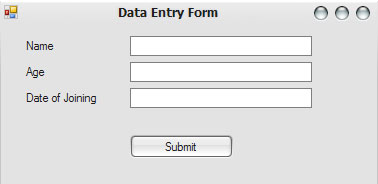
หาก กำหนดว่า ในช่อง TextBox Name จะต้องมีข้อมูล อย่างน้อย 1 ตัวอักษร ไม่สามารถปล่อยว่างได้ ในช่อง Age จะต้องกรอกข้อมูล เป็นตัวเลข มากกว่า 35 และสุดท้าย Date of joining จะต้องไม่เกินวันที่ปัจจุบัน เราสามารถจะทำได้โดย ป้อน Code ลงใน Validating ของ TextBox ดังนี้
// TextBox for Name
private void textBox1_Validating(Object sender, CancelEventArgs e)
{
if(textBox1.Text.Length == 0)
// Prompt the user to enter his name
}
// TextBox for Age
private void textBox2_Validating(Object sender, CancelEventArgs e)
{
if(Convert.ToInt32(textBox2.Text) < 35)
// Prompt the user to enter age greater than 35
}
// TextBox for Date of join
private void textBox3_Validating(Object sender, CancelEventArgs e)
{
if(Convert.ToDateTime(textBox3.Text) > DateTime.Now)
// Prompt the user to enter date prior to the current date
}
สังเกตุว่า Validating event ต้องการ Argument สองตัวคือ
- sender อ้างอิง object ที่เป็นเจ้าของ event
- e ใช้สำหรับการ cancel validating event
สำหรับ e นั้น จะทำให้ ผู้ใช้ ตรึง focus ไว้ที่ control เดิมตราบเท่า ที่ข้อมูลที่ป้อนจะเป็นไปตาม ข้อกำหนด หรือเป็นไปตามเงื่อนไข การใช้งาน e ตามตัวอย่าง
// TextBox for Name
private void textBox1_Validating(Object sender, CancelEventArgs e)
{
if(textBox1.Text.Length == 0)
{
// Prompt the user to enter his name
MessageBox.Show(“Enter name”, “Error”, MessageBoxButtons.OK, MessageBoxIcon.Error);
e.Cancel = true;
}
}
สำหรับการทำ validate โดย concept ก็เป็น ไปตามที่ได้ อธิบาย ไปแล้ว สำหรับการแสดง ข้อความหรือ Message เพื่อแจ้งหรือโต้ตอบ
กับผู้ใช้นั้น จะกล่าวต่อไป ซึ่งโดยมากที่ใช้งานกันก็คือ MessageBox ErrorProvider control และ StatusStrip control
โปรดติดตามต่อไป สำหรับผู้ที่ติดตามอ่าน Blog นี้นะครับ ผมอ้างอิงกับ Visual Studio 2005 นะครับ
Simple Application, ListBox and Item
Simple ListBox exercise….. create two list box , one button and one label as following picture.
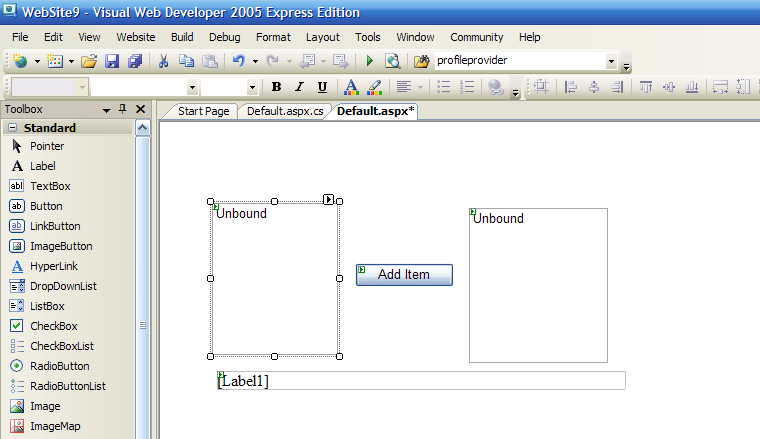 Select button and set the properties text as “Add Item” , and ID as “addItem”
For the First list box click the upper right icon and “Edit item”
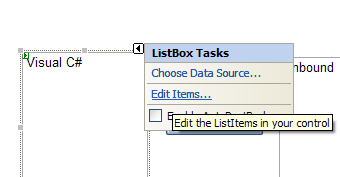
null
And then , show the ListItem Collection Editor
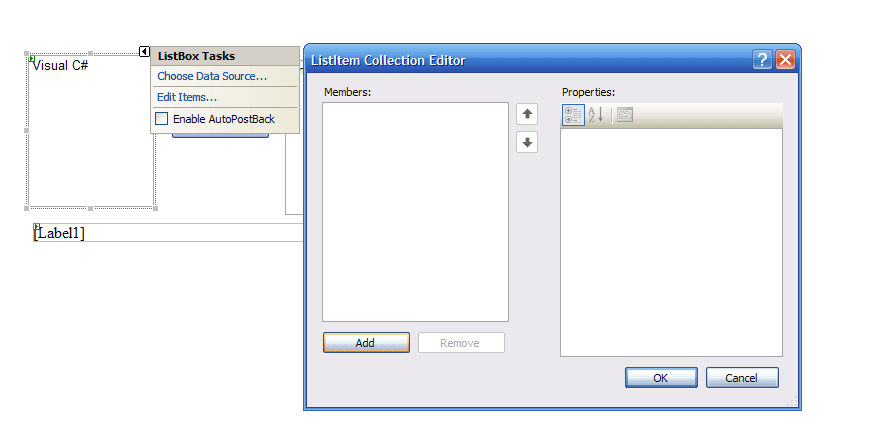
To add the item –> Click Add button and Input the Text properties anything you want.
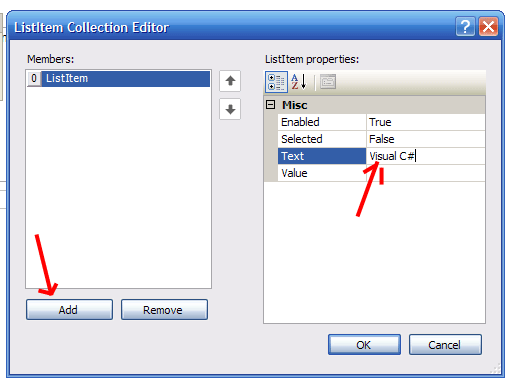
After finish Adding item Click ok. You will get the list of all items in the first Listbox
To add the code, Double click on “Add button” and put the following code.
using System.Web.UI;
using System.Web.UI.WebControls;
using System.Web.UI.WebControls.WebParts;
using System.Web.UI.HtmlControls;
public partial class _Default : System.Web.UI.Page
{
protected void Page_Load(object sender, EventArgs e)
{
}
protected void adItem_Click(object sender, EventArgs e)
{
if (ListBox1.SelectedIndex != -1) // to check, is there any item in the first listbox is selected.
{
Label1.Text = “Move -> ” + ListBox1.SelectedItem.Value; // show, the moved item
ListBox2.Items.Add(ListBox1.SelectedItem.Text); // add the selected item to the second listbox.
ListBox1.Items.RemoveAt(ListBox1.SelectedIndex); // Remove the selected item from the first listbox
}
else
{
Label1.Text = “Error , Please item you want to move “;
}
}
}
The game of life, the classic problem and unbeliverable.
What is the game of life ????
The game of life ( or simply life ) is not a game in convenional sense. There are no players , and no winning or losing. One the “piece” are placed in the starting position, the rules determine everything that happens later. Nevertheless , life is full of surprise! In most cases, it is impossible to look at starting position ( or pattern ) and see what will happen in the future. The only way to find out is to follow the rules of the game…..
There is a good reference site for the rule of this game go to this link : http://www.math.com/students/wonders/life/life.html or if you want to see some online example go : http://www.bitstorm.org/gameoflife/ and this is my code for the game of life in C++ version ( and very simple one )
#include
using namespace std;
int main(int argc, char *argv[])
{
const int row = 34 ;
const int col = 34 ;
// this table for displaying the result
int myTable[row+1][col+1] = {{0}};
// this table for caculating …
int cTable[row+1][col+1]=
{{0,0,0,0,0,0,0,0,0,0,0,0,0,0,0,0,0,0,0,0,0,0,0,0,0,0,0,0,0,0,0,0,0,0,0},
{0,0,0,0,0,0,0,0,0,0,0,0,0,0,0,0,0,0,0,0,0,0,0,0,0,0,0,0,0,0,0,0,0,0,0},
{0,0,0,0,0,0,0,0,0,0,0,0,0,0,0,0,0,0,0,0,0,0,0,0,0,0,0,0,0,0,0,0,0,0,0},
{0,0,0,0,0,0,0,0,0,0,0,0,0,0,0,0,0,0,0,0,0,0,0,0,0,0,0,0,0,0,0,0,0,0,0},
{0,0,0,0,0,0,0,0,0,0,0,0,0,0,0,0,0,0,0,0,0,0,0,0,0,0,0,0,0,0,0,0,0,0,0},
{0,0,0,0,0,0,0,0,0,0,0,0,0,0,0,0,0,0,0,0,0,0,0,0,0,0,0,0,0,0,0,0,0,0,0},
{0,0,0,0,0,0,0,0,0,0,0,0,0,0,0,0,0,0,0,0,0,0,0,0,0,0,0,0,0,0,0,0,0,0,0},
{0,0,0,0,0,0,0,0,0,0,0,0,0,0,0,0,0,0,0,0,0,0,0,0,0,0,0,0,0,0,0,0,0,0,0},
{0,0,0,0,0,0,0,0,0,0,0,0,0,0,0,0,0,0,0,0,0,0,0,0,0,0,0,0,0,0,0,0,0,0,0},
{0,0,0,0,0,0,0,0,0,0,0,1,0,0,0,0,0,0,0,0,1,0,0,0,0,0,0,0,0,0,0,0,0,0,0},
{0,0,0,0,0,0,0,0,0,0,0,1,0,0,0,0,0,0,0,1,1,1,0,0,0,0,0,0,0,0,0,0,0,0,0},
{0,0,0,0,0,0,0,0,0,0,0,1,0,0,0,0,0,0,0,1,0,1,0,0,0,0,0,0,0,0,0,0,0,0,0},
{0,0,0,0,0,0,0,0,0,0,0,0,0,0,0,0,0,0,0,1,1,1,0,0,0,0,0,0,0,0,0,0,0,0,0},
{0,0,0,0,0,0,0,0,0,0,0,0,0,0,0,0,0,0,0,0,1,0,0,0,0,0,0,0,0,0,0,0,0,0,0},
{0,0,0,0,0,0,0,0,0,0,0,0,0,0,0,0,0,0,0,0,0,0,0,0,0,0,0,0,0,0,0,0,0,0,0},
{0,0,0,0,0,0,0,0,0,0,0,0,0,0,0,0,0,0,0,0,0,0,0,0,0,0,0,0,0,0,0,0,0,0,0},
{0,0,0,0,0,0,0,0,0,0,0,0,0,0,0,0,0,0,0,0,0,0,0,0,0,0,0,0,0,0,0,0,0,0,0},
{0,0,0,0,0,0,0,0,0,0,0,0,0,0,0,0,0,0,0,0,0,0,0,0,0,0,0,0,0,0,0,0,0,0,0},
{0,0,0,0,0,0,0,0,0,0,0,1,0,0,0,0,0,0,0,1,0,0,0,0,0,0,0,0,0,0,0,0,0,0,0},
{0,0,0,0,0,0,0,0,0,0,1,1,1,0,0,0,0,0,0,1,0,0,0,0,0,0,0,0,0,0,0,0,0,0,0},
{0,0,0,0,0,0,0,0,0,0,1,0,1,0,0,0,0,0,0,1,0,0,0,0,0,0,0,0,0,0,0,0,0,0,0},
{0,0,0,0,0,0,0,0,0,0,1,1,1,0,0,0,0,0,0,0,0,0,0,0,0,0,0,0,0,0,0,0,0,0,0},
{0,0,0,0,0,0,0,0,0,0,0,1,0,0,0,0,0,0,0,0,0,0,0,0,0,0,0,0,0,0,0,0,0,0,0},
{0,0,0,0,0,0,0,0,0,0,0,0,0,0,0,0,0,0,0,0,0,0,0,0,0,0,0,0,0,0,0,0,0,0,0},
{0,0,0,0,0,0,0,0,0,0,0,0,0,0,0,0,0,0,0,0,0,0,0,0,0,0,0,0,0,0,0,0,0,0,0},
{0,0,0,0,0,0,0,0,0,0,0,0,0,0,0,0,0,0,0,0,0,0,0,0,0,0,0,0,0,0,0,0,0,0,0},
{0,0,0,0,0,0,0,0,0,0,0,0,0,0,0,0,0,0,0,0,0,0,0,0,0,0,0,0,0,0,0,0,0,0,0},
{0,0,0,0,0,0,0,0,0,0,0,0,0,0,0,0,0,0,0,0,0,0,0,0,0,0,0,0,0,0,0,0,0,0,0},
{0,0,0,0,0,0,0,0,0,0,0,0,0,0,0,0,0,0,0,0,0,0,0,0,0,0,0,0,0,0,0,0,0,0,0},
{0,0,0,0,0,0,0,0,0,0,0,0,0,0,0,0,0,0,0,0,0,0,0,0,0,0,0,0,0,0,0,0,0,0,0},
{0,0,0,0,0,0,0,0,0,0,0,0,0,0,0,0,0,0,0,0,0,0,0,0,0,0,0,0,0,0,0,0,0,0,0},
{0,0,0,0,0,0,0,0,0,0,0,0,0,0,0,0,0,0,0,0,0,0,0,0,0,0,0,0,0,0,0,0,0,0,0},
{0,0,0,0,0,0,0,0,0,0,0,0,0,0,0,0,0,0,0,0,0,0,0,0,0,0,0,0,0,0,0,0,0,0,0},
{0,0,0,0,0,0,0,0,0,0,0,0,0,0,0,0,0,0,0,0,0,0,0,0,0,0,0,0,0,0,0,0,0,0,0},
{0,0,0,0,0,0,0,0,0,0,0,0,0,0,0,0,0,0,0,0,0,0,0,0,0,0,0,0,0,0,0,0,0,0,0} } ;
int count = 1; ;
int Pcount ;
while(count < 1000)
{//----------------------Start of while -----------------------------------
cout << "Round number : " << count << endl ;
for ( int i = 0; i < row ; i++)
{
for (int j = 0; j < col; j++)
{
Pcount = 0;
//------------------------------------------------------------------
// Determine amount of neihbore cell....
// -----------------------------------------------------------------
if (( i == 0 )&& ( j == 0 )) // Upper left corner
{
if (cTable[i+1][j] == 1)
Pcount++;
if (cTable[i+1][j+1] == 1)
Pcount++;
if (cTable[i][j+1] == 1)
Pcount++;
}
else if (( i == 0 ) && ( j > 0 )) // Upper border …..
{
if (cTable[i][j-1] == 1 )
Pcount++;
if (cTable[i+1][j-1] == 1)
Pcount++;
if (cTable[i+1][j] == 1)
Pcount++;
if (cTable[i+1][j+1] == 1)
Pcount++ ;
if (cTable[i][j+1] == 1)
Pcount++;
}
else if ( ( i == 0 ) && ( j == col )) // Upper right cornet
{
if (cTable[i+1][j] == 1)
Pcount++;
if (cTable[i+1][j-1] == 1)
Pcount++;
if (cTable[i][j-1] == 1)
Pcount++;
}
else if ( ( j == 0 ) && ( i > 0 ) ) // left border …………
{
if (cTable[i-1][j] == 1)
Pcount++;
if (cTable[i-1][j+1] == 1)
Pcount++;
if (cTable[i][j+1] == 1)
Pcount++;
if (cTable[i+1][j+1] ==1)
Pcount++;
if (cTable[i+1][j] == 1)
Pcount++;
}
else if ( ( j == 0 ) && ( i == row )) // lower left
{
if(cTable[i-1][j] == 1 )
Pcount++;
if(cTable[i-1][j+1] == 1)
Pcount++;
if(cTable[i][j+1] == 1)
Pcount++;
}
else if ( ( i == row ) && ( j > 0 ) ) // lower border …….
{
if(cTable[i][j-1] == 1)
Pcount++;
if(cTable[i-1][j-1] == 1)
Pcount++;
if(cTable[i-1][j] == 1)
Pcount++;
if(cTable[i-1][j+1] == 1)
Pcount++;
if(cTable[i][j+1] == 1)
Pcount++;
}
else if ( ( i == row ) && ( j == col )) // lower right
{
if(cTable[i][j-1] == 1 )
Pcount++;
if(cTable[i-1][j-1] == 1)
Pcount++;
if(cTable[i-1][j] == 1)
Pcount++;
}
else if ( ( i > 0 ) && ( j == col )) // right border …..
{
if(cTable[i+1][j] == 1)
Pcount++;
if(cTable[i+1][j-1] == 1)
Pcount++;
if(cTable[i][j-1] == 1)
Pcount++;
if(cTable[i-1][j-1] == 1)
Pcount++;
if(cTable[i-1][j] ==1)
Pcount++;
}
else if ( (( i > 0 ) && ( i < row )) && ( ( j > 0 )&&( j < col )) ) // inside the box ......
{
if(cTable[i-1][j-1]==1)
Pcount++;
if(cTable[i-1][j] == 1)
Pcount++;
if(cTable[i-1][j+1] == 1)
Pcount++;
if(cTable[i][j-1] == 1)
Pcount++;
if(cTable[i][j+1] == 1)
Pcount++;
if(cTable[i+1][j-1] == 1)
Pcount++;
if(cTable[i+1][j] == 1)
Pcount++;
if(cTable[i+1][j+1] == 1)
Pcount++;
}
else
{
Pcount = 0;
}
// -----------------------------------------------------------------
// Determine and plot to myTable...
// This part apply to all i,j
// -----------------------------------------------------------------
if ( cTable[i][j] == 0 ) // dead cell
{
if ( Pcount == 3 )
{
myTable[i][j] = 1;
}
}
else // life cell
{
if ( ( Pcount == 2 ) || ( Pcount == 3) )
{
myTable[i][j] = 1;
}
else
{
myTable[i][j] = 0 ;
}
}
}
}
// -------------------------------------------------------------------------
// -------- Copy all from myTable to cTable , for the next calculation -----
// -------------------------------------------------------------------------
for (int i = 0; i < row; i++)
{
for(int j = 0; j < col; j++)
{
cTable[i][j]= myTable[i][j];
}
}
// --------------------------------------------------------------------------
// ------- Display the result -----------------------------------------------
// --------------------------------------------------------------------------
for ( int i = 0; i < row; i++ )
{
for(int j= 0; j < col; j++)
{
//cout << myTable[i][j] << " " ;
if (myTable[i][j] == 1 )
{
cout << "*" << "" ;
}
else
{
cout << "-" << "";
}
}
//cout << endl;
cout << endl;
}
//--------------------------------------------------------------------------
// Clear The display Table....
for ( int i = 0; i < row; i++ )
{
for(int j= 0; j < col; j++)
{
myTable[i][j] = 0;
}
}
// delay form some amount of time..
Time_Delay();
// clear the console...
system("cls");
// Add one to count ...
count++;
}// end of while
system("PAUSE");
return EXIT_SUCCESS;
}
//----------------------------------------------------------------------------------------------
// ---- Function Library -----------------------------------------------------------------------
//----------------------------------------------------------------------------------------------
void Time_Delay(void)
{
//-----------------------------------------------------------------------------------------
// delay for some amount of times... don't know how many , but just some amount of time..
//-----------------------------------------------------------------------------------------
for ( int i = 0; i < 10000 ; i++)
{
for ( int j = 0; j < 20000 ; j++)
{
;
}
}
}
[/sourcecode]
The publication, book and tape classes , more advance….
Add another base class sales that holds and array of three floats it can record the sales of a particular publication for the last three months. Include getdata() function to get three sales amounts from the user , and a putdata() function to display the sales figures. Alter the book and tape classes so that they are derived from both publication and sales. An object of class book or tape should input or output sales along with its other data.
#include
using namespace std;
class sale
{
private:
float salerec[3];
public:
void getdata()
{
cout << " Enter the sales for the last three months :" << endl;
for (int i = 0; i < 3 ; i++)
{
cout << " Enter sales for month : " << i+1 << " > “;
cin >> salerec[i];
}
}
void putdata()
{
cout << " The sale of the last three month " << endl;
for(int i=0; i < 3; i++)
{
cout << " Month no : " << i+1 << " > ” << salerec[i] << endl;
}
}
};
class publication
{
private:
char title[50] ;
float price;
public:
void getdata()
{
cout << " Enter publication title : " ;
cin >> title;
cout << " Enter publication price : " ;
cin >> price;
}
void putdata()
{
cout << " Publication title : " << title << endl;
cout << " Publication price : " << price << endl;
}
}; // end of class publication
class book : public publication, public sale
{
private:
int pageCount ;
public:
void getdata()
{
publication::getdata();
cout << " Enter page count : " ;
cin >> pageCount;
sale::getdata();
}
void putdata()
{
publication::putdata();
cout << " Page count : " << pageCount ;
cout << endl;
sale::putdata();
}
};
class tape : public publication , public sale
{
private:
int playingtime;
public:
void getdata()
{
publication::getdata();
cout << " Enter page count : ";
cin >> playingtime;
sale::getdata();
}
void putdata()
{
publication::putdata();
cout << " Playing time : " << playingtime;
cout << endl;
sale::putdata();
}
};
int main(int argc, char** argv) {
book mybook;
//tape mytape;
// get the book data
mybook.getdata();
//mybook.sale::getdata();
mybook.putdata();
//mybook.sale::putdata();
// get the tape data
//mytape.getdata();
//mytape.putdata();
return (EXIT_SUCCESS);
}
[/sourcecode]
Inheritance , Classroom Exercise, NIIT student
Create a class called publication that store the title ( a string ) and price ( type float ) of a publication. From this class, derive two class: book which adds a page count ( type int ); and tape , which adds a playing time (type int ) in minutes. Each of these classes should have a getdata() function to get its data from the user, and a putdata() to display its data.
//———————————————————
#include
using namespace std;
class publication
{
private:
char title[50] ;
float price;
public:
void getdata()
{
cout << " Enter publication title : " ;
cin >> title;
cout << " Enter publication price : " ;
cin >> price;
}
void putdata()
{
cout << " Publication title : " << title << endl;
cout << " Publication price : " << price << endl;
}
}; // end of class publication
class book : public publication
{
private:
int pageCount ;
public:
void getdata()
{
publication::getdata();
cout << " Enter page count : " ;
cin >> pageCount;
}
void putdata()
{
publication::putdata();
cout << " Page count : " << pageCount ;
cout << endl;
}
};
class tape : public publication
{
private:
int playingtime;
public:
void getdata()
{
publication::getdata();
cout << " Enter page count : ";
cin >> playingtime;
}
void putdata()
{
publication::putdata();
cout << " Playing time : " << playingtime;
cout << endl;
}
};
int main(int argc, char** argv) {
book mybook;
tape mytape;
// get the book data
mybook.getdata();
mybook.putdata();
// get the tape data
mytape.getdata();
mytape.putdata();
return (EXIT_SUCCESS);
}
[/sourcecode]
.. That what i've done with the exercise ...

 Teerapong Sontayaman 's Kode Talker .NET